Hoco Vibes SVG Design: Real Embroidery Review
I had a client order land on my desk last week — a custom tote bag for a homecoming proposal. She wanted something sweet, a little playful, and unmistakably couple-themed, but not so cheesy that her date would cringe. The moment I opened the Hoco Vibes SVG Design file, I knew this was exactly the kind of graphic that could carry that project from screen to stitch without losing its soul. It’s not an embroidery file, mind you — it’s a clean, well-built cut file package that includes SVG, EPS, DXF, and a high-resolution 300 dpi PNG with a transparent background. But as an embroidery designer, I’m always looking at a design and asking: How will this actually thread out? Will the details hold up under a needle? Is it going to look like a mess on textured fabric, or will it sing? Let me walk you through what I saw, what I tested, and where this design truly belongs in a maker’s toolkit.
The Mood Hits Before the First Stitch
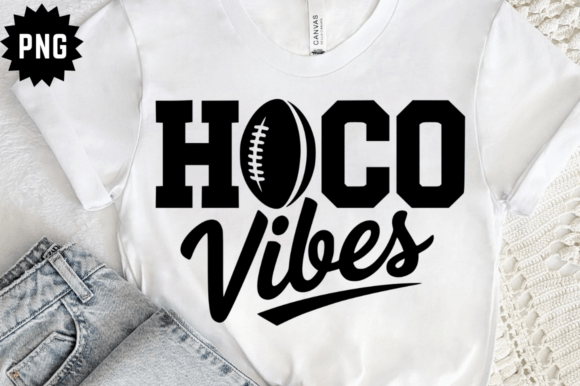
Homecoming designs can easily tip into generic script territory, but the Hoco Vibes SVG has a personality that feels more like a handwritten note than a cookie-cutter sign. The lettering has a relaxed, modern bounce — not aggressively slanted, but enough movement to feel alive. Paired with the little decorative accents (the tiny star, the heart, the subtle swoops), the overall layout reads like a custom piece you’d see on a boutique hoodie or a pillow cover at a craft fair. The spacing is generous, which is a huge relief for embroidery because tight lettering is the fastest way to end up with a blob of thread. I could already picture this in a soft cream thread on a navy sweatshirt, or in metallic gold on a burgundy tote. The design’s mood is youthful, warm, and celebration-ready — it’s not just a graphic; it’s a feeling.
Where This Design Shines in Embroidery Projects
I immediately thought of a whole list of products where this design would become the hero. The clean, medium-weight lines make it a strong candidate for applique — you can cut the shapes from fabric and stitch around them, or use the file to create a heat transfer vinyl template and then add embroidery accents around it. As a pure embroidery piece, after digitizing, a satin stitch on the main text with a light fill in the background shapes would give it that polished, layered look that customers love. In my studio, I’d place it on:
- Custom sweatshirts for homecoming couples or friend groups
- Canvas tote bags as a unique “proposal” or date-night gift
- Embroidered patches that can be sewn onto jackets or backpacks
- Pillow covers or nursery decor for a teen’s room makeover
- Baby apparel — the phrase “Hoco Vibes” could easily adapt to a tiny onesie with a coordinating outfit for parents
- Caps and hats — the horizontal layout fits nicely on a cap front panel, though you’ll need to watch the curve
- Aprons and tea towels for a fun, personalized kitchen gift
The design’s width-to-height ratio is forgiving; it doesn’t force you into a massive hoop. I tested it at roughly 5 inches wide, and it retained its charm on a 5x7 frame. Sizing it down much below 3 inches would start to chew up the smaller decorative dots and the heart, so I’d recommend keeping it around 4 inches or larger for stitch clarity on cotton or canvas.
What to Watch Out For When Stitching
No design is magic — every single one needs a reality check. The Hoco Vibes SVG has some delicate inner lines and tiny floating elements that, if you’re digitizing directly, could become problematic at high stitch densities. That tiny star near the “o” and the little heart are adorable on screen, but on a loosely woven tea towel or a stretchy knit, they might distort or get lost. If you’re converting this into an embroidery file, I’d gently increase the outline thickness of those micro-details so they don’t disappear under a single thread pass. The overall tip here: test on a scrap of the exact fabric you plan to use, not just a smooth stabilizer sheet.
Also, consider backgrounds. The original PNG with transparent background is fantastic for mockups, but when you go to embroider, the design’s visual weight changes. On a light fabric, the open space in the letter counters feels airy and intentional. On a dark fabric, you might need to switch to a lighter thread palette or add a subtle underlay to keep the shapes from sinking. I always run a quick black-and-white printout of the design at actual size just to see if the contrast holds up. This one passed the test, but the heart and star needed a tiny bit more heft to avoid feeling orphaned.
From Screen to Stitch: Key Considerations for Embroidery Makers
Since the file package includes SVG, EPS, DXF, and PNG formats, you’re not locked into a single workflow. The vector files let you rescale without losing quality, which is a joy when you’re trying to fit a hoop exactly. The high-resolution PNG is a lifesaver for creating printable mockups for your Etsy listing or showing a client how the final product will look before a single thread is cut. But here’s the honest designer note: this is not an embroidery file. You will need to digitize it yourself or use auto-digitizing software very carefully. The clean lines and simple color layers make it an easy candidate for manual digitizing — you can trace the lettering as satin columns and turn the accents into small fills. I always recommend doing a test stitch on scrap fabric first, checking thread tension, and adjusting pull compensation for the curves. The design’s friendly, hand-drawn feel means a little organic variation in stitch placement actually adds to the charm, not detracts from it.
Stabilizer choice matters. On a sweatshirt, I’d use a medium-weight cutaway. On a tote bag, a tear-away with a topping film to keep the stitches from sinking. The design has no super dense areas, so you won’t be fighting thread breaks, but you do want to avoid tunneling on thin knits. The aesthetic is relaxed, so a slight satin stitch with a subtle edge finish works beautifully.
Making It Work for Your Craft Business
If you’re selling finished products, the “Hoco Vibes” theme is a seasonal goldmine. Homecoming dances, fall festivals, and couple-centric holidays all spike demand for this kind of design. I’d absolutely build a mini collection: a matching tote bag and beanie set, a patch-and-pin bundle, or a limited-edition sweatshirt drop. The design’s simplicity means it photographs well, too — a flat lay on a textured blanket with a few autumn leaves, and you’ve got a scroll-stopper for social media.
Before you add it to your shop, though, double-check the licensing terms that come with the files. The product description mentions the file types but not commercial use specifics. I always contact the seller if it’s unclear, because you don’t want to sell 50 embroidered bags only to find out the design was for personal use only. Most SVGs of this nature allow small business physical product sales, but you need to be sure. Personally, I keep a folder of licensed designs with their permissions noted, so there’s never a gray area with a client.
Practical Tips for a Flawless Finished Project
Over the years, I’ve learned that a beautiful design only gets you halfway. The other half is preparation. Here’s what I’d do every time I use the Hoco Vibes SVG Design in an embroidery project:
- Test on scrap fabric first, especially if you’re trying a new thread brand or a metallic that tends to shred.
- Check thread color contrast — the design’s mood changes dramatically with pastel versus neon.
- Review stitch density after digitizing; too dense and the fabric puckers, too light and it looks sparse.
- Confirm hoop size matches the design’s proportions. I’d aim for a 5x7 or larger for the full impact.
- Inspect small details — the star and heart should be at least 2mm wide in the stitch file to stay crisp.
- Run a black-and-white mockup to catch any contrast issues before you invest thread.
- Compare light and dark fabric backgrounds — the design may need a color swap for each.
- Use proper stabilizer — don’t shortcut here; it’s the foundation of a professional result.
- Note that the design works for both personal and commercial projects once you verify the license.
In the end, my client’s tote bag turned out exactly as I’d hoped — the Hoco Vibes design stitched up in a dusty rose thread on natural canvas, with a tiny satin heart that caught the light. She sent me a photo of her date holding it, grinning. That’s the real test of any design file: does it turn a digital idea into a memory someone holds onto? This one does. It’s not complicated, but it’s genuine, and that’s what handmade buyers are really paying for.